Template gallery · API v1
Label template gallery
Working requests for common labels. Copy one, change the data and the coordinates, and send it. Each shows the ZPL the API returns and a preview drawn from that ZPL.
Shipping label
A 4 × 2 inch label for parcels between sites: who it goes to, the tracking number as Code 128 and in text, and a tracking link as a QR code.
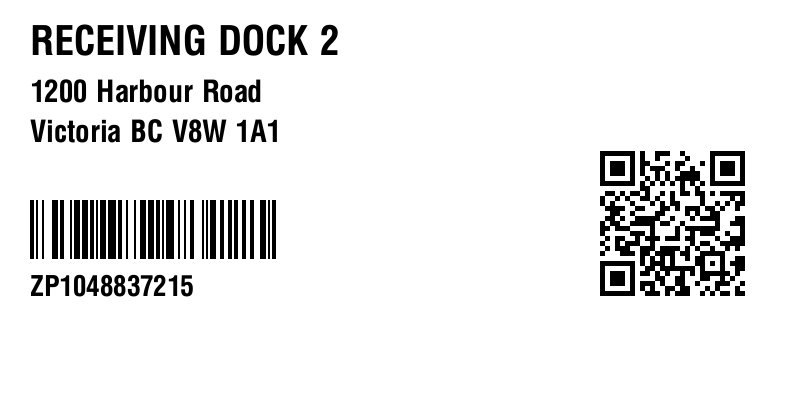
1{2 "config": {3 "size": "4x2"4 },5 "data": {6 "name": "RECEIVING DOCK 2",7 "street": "1200 Harbour Road",8 "city": "Victoria BC V8W 1A1",9 "tracking": "ZP1048837215",10 "trackUrl": "https://example.com/t/ZP1048837215"11 },12 "templates": [13 {14 "type": "Text",15 "dataPath": "name",16 "coords": [30, 25],17 "font": "0,40",18 "maxLength": 2419 },20 {21 "type": "Text",22 "dataPath": "street",23 "coords": [30, 80],24 "font": "0,30",25 "maxLength": 3026 },27 {28 "type": "Text",29 "dataPath": "city",30 "coords": [30, 120],31 "maxLength": 3032 },33 {34 "type": "BarCode",35 "dataPath": "tracking",36 "coords": [30, 200],37 "style": "code128"38 },39 {40 "type": "Text",41 "dataPath": "tracking",42 "coords": [30, 275],43 "font": "0,28"44 },45 {46 "type": "QRCode",47 "dataPath": "trackUrl",48 "coords": [600, 150],49 "magnification": 550 }51 ]52}^XA^MCY^XZ
^XA
^SZ2
^MMT
^MNY
^LL406
^PW812
^LH0,0
^CF0,40^FO30,25^FDRECEIVING DOCK 2^FS
^CF0,30^FO30,80^FD1200 Harbour Road^FS
^FO30,120^FDVictoria BC V8W 1A1^FS
^BY2,2,59^FO30,200^BCN,,N,N,N,A^FDZP1048837215^FS
^CF0,28^FO30,275^FDZP1048837215^FS
^BY2,2,0^FO600,150^BQN,2,5^FDQA,https://example.com/t/ZP1048837215^FS
^XZAsset tag
A 3 × 1 inch tag for equipment: the owning department, where it lives, and the asset number as Code 128.
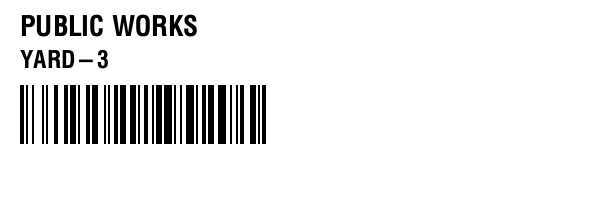
1{2 "config": {3 "size": "3x1"4 },5 "data": {6 "asset": "AST-88213",7 "dept": "PUBLIC WORKS",8 "location": "YARD-3"9 },10 "templates": [11 {12 "type": "Text",13 "dataPath": "dept",14 "coords": [20, 15],15 "font": "0,28",16 "maxLength": 2017 },18 {19 "type": "Text",20 "dataPath": "location",21 "coords": [20, 50],22 "font": "0,24"23 },24 {25 "type": "BarCode",26 "dataPath": "asset",27 "coords": [20, 85],28 "style": "code128"29 }30 ]31}^XA^MCY^XZ
^XA
^SZ2
^MMT
^MNY
^LL203
^PW609
^LH0,0
^CF0,28^FO20,15^FDPUBLIC WORKS^FS
^CF0,24^FO20,50^FDYARD-3^FS
^BY2,2,59^FO20,85^BCN,,N,N,N,A^FDAST-88213^FS
^XZParking permit
A 4 × 2 inch permit: the permit number, the zone, the date it is valid through, and a QR code an officer can scan to check it.
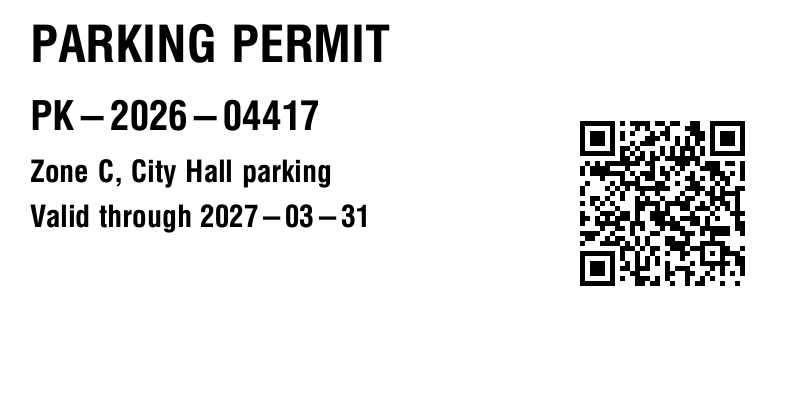
1{2 "config": {3 "size": "4x2"4 },5 "data": {6 "title": "PARKING PERMIT",7 "permit": "PK-2026-04417",8 "zone": "Zone C, City Hall parking",9 "valid": "Valid through 2027-03-31",10 "checkUrl": "https://example.com/permits/PK-2026-04417"11 },12 "templates": [13 {14 "type": "Text",15 "dataPath": "title",16 "coords": [30, 25],17 "font": "0,50"18 },19 {20 "type": "Text",21 "dataPath": "permit",22 "coords": [30, 100],23 "font": "0,40"24 },25 {26 "type": "Text",27 "dataPath": "zone",28 "coords": [30, 160],29 "font": "0,30",30 "maxLength": 2631 },32 {33 "type": "Text",34 "dataPath": "valid",35 "coords": [30, 205]36 },37 {38 "type": "QRCode",39 "dataPath": "checkUrl",40 "coords": [580, 120],41 "magnification": 542 }43 ]44}^XA^MCY^XZ
^XA
^SZ2
^MMT
^MNY
^LL406
^PW812
^LH0,0
^CF0,50^FO30,25^FDPARKING PERMIT^FS
^CF0,40^FO30,100^FDPK-2026-04417^FS
^CF0,30^FO30,160^FDZone C, City Hall parking^FS
^FO30,205^FDValid through 2027-03-31^FS
^BY2,2,0^FO580,120^BQN,2,5^FDQA,https://example.com/permits/PK-2026-04417^FS
^XZInventory label
A 3 × 1 inch product label: a description, your SKU, and the product's EAN-13 barcode.
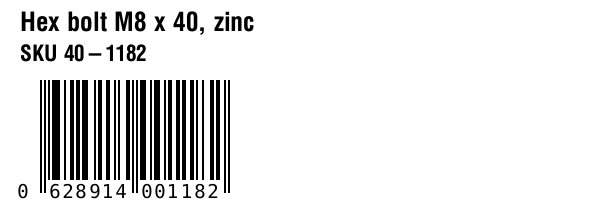
1{2 "config": {3 "size": "3x1"4 },5 "data": {6 "description": "Hex bolt M8 x 40, zinc",7 "sku": "SKU 40-1182",8 "ean": "062891400118"9 },10 "templates": [11 {12 "type": "Text",13 "dataPath": "description",14 "coords": [20, 12],15 "font": "0,26",16 "maxLength": 2817 },18 {19 "type": "Text",20 "dataPath": "sku",21 "coords": [20, 45],22 "font": "0,22"23 },24 {25 "type": "BarCode",26 "dataPath": "ean",27 "coords": [40, 80],28 "style": "ean13"29 }30 ]31}^XA^MCY^XZ
^XA
^SZ2
^MMT
^MNY
^LL203
^PW609
^LH0,0
^CF0,26^FO20,12^FDHex bolt M8 x 40, zinc^FS
^CF0,22^FO20,45^FDSKU 40-1182^FS
^BY2,2,59^FO40,80^BEN,100,Y,N^FD062891400118^FS
^XZBin label
A 3 × 1 inch shelf label: the bin location large enough to read from the aisle, and the same location as Code 128.
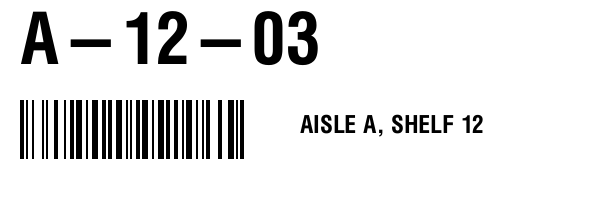
1{2 "config": {3 "size": "3x1"4 },5 "data": {6 "bin": "A-12-03",7 "area": "AISLE A, SHELF 12"8 },9 "templates": [10 {11 "type": "Text",12 "dataPath": "bin",13 "coords": [20, 12],14 "font": "0,70",15 "maxLength": 816 },17 {18 "type": "Text",19 "dataPath": "area",20 "coords": [300, 115],21 "font": "0,24",22 "maxLength": 1823 },24 {25 "type": "BarCode",26 "dataPath": "bin",27 "coords": [20, 100],28 "style": "code128"29 }30 ]31}^XA^MCY^XZ
^XA
^SZ2
^MMT
^MNY
^LL203
^PW609
^LH0,0
^CF0,70^FO20,12^FDA-12-03^FS
^CF0,24^FO300,115^FDAISLE A, SHELF 12^FS
^BY2,2,59^FO20,100^BCN,,N,N,N,A^FDA-12-03^FS
^XZChanging a template
- Coordinates are dots from the top-left corner. At 203 dpi a 3 × 1 inch label is 609 × 203 dots and a 4 × 2 inch label 812 × 406, so keep every element inside those.
- Set
maxLengthon any text whose length you do not control. Text does not wrap. - Scan every barcode and QR code on a printed label before relying on it.
Sending it
- Call the API from your own server or integration engine, not from a web page. An API key in a browser is a key anyone can copy.
- A successful call answers
200with the ZPL as plain text. A request the API cannot turn into a label answers400with every problem listed by field, and is not billed. - Send the ZPL to a Zebra or other ZPL printer at 203 dpi. At 300 dpi the same label prints at two-thirds of the size.
The API reference has every field and status code.
Help with an integration
Email info@zeepler.com. You will get a reply within 2 business days. The support policy covers response times and version changes.